The Ultimate Guide to the Best Free AI Kitchen Design Tools: Planning Your Renovation Without the Price Tag
Key Takeaways:
- Stop Guessing: Learn how to visualize expensive decisions (like cabinetry color or countertop material) before spending a dime.
- Tool Selection: A breakdown of the best free AI kitchen design software based on your needs-whether you need a floor plan, a mood board, or a photorealistic preview.
- Workflow: How to combine different AI tools to act as your own interior designer.
- Risk Management: Using visualization to avoid the dreaded "change orders" that blow renovation budgets.
*This post may contain affiliate links and I'll earn a commission if you shop through them. You can read my full disclosure here.
Introduction: The "Million Dollar" Room
The kitchen is the engine room of the home. It is where we cook, eat, argue over homework, and host our friends. It is also, statistically, the most expensive room to renovate. According to industry reports, the average kitchen remodel costs tens of thousands of dollars. With stakes that high, the fear of making a mistake is paralyzing.
We have all seen the renovation horror stories: the "trendy" tile that looks chaotic once installed, the island that blocks the dishwasher, or the paint color that looked perfect on the swatch but turns the room gloomy.
In the past, the only way to avoid these pitfalls was to hire a professional kitchen designer, costing you thousands in fees before you even bought a faucet. But the democratization of technology has changed the game. Today, savvy homeowners are turning to free AI kitchen design tools to bridge the gap between their imagination and reality.
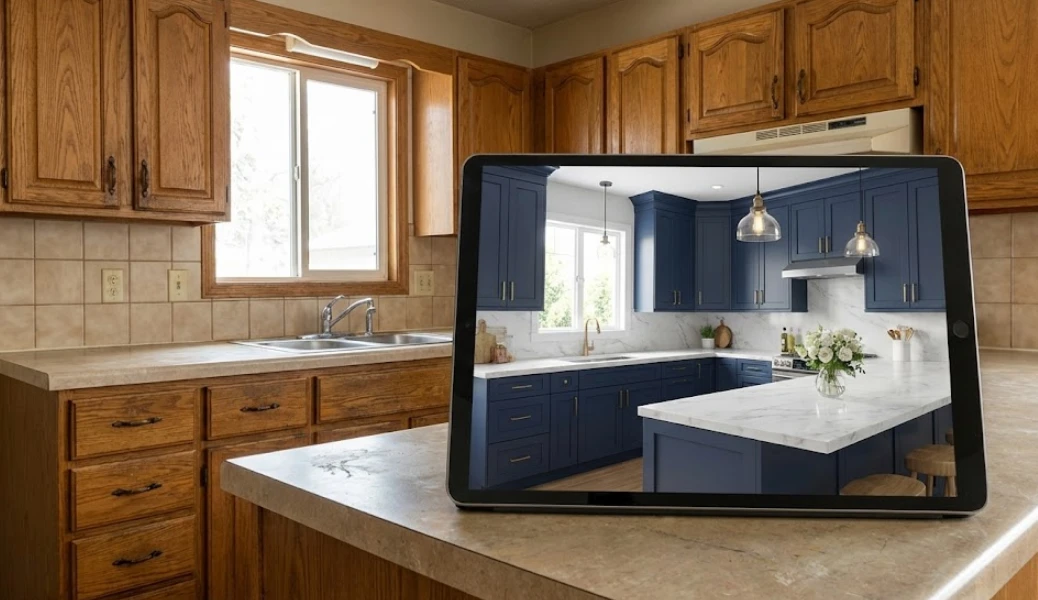
These tools allow you to "fail virtually." You can test that bold navy blue cabinet paint, swap the granite for quartz, and rearrange the layout-all without lifting a hammer. In this comprehensive guide, we will explore the top tools available in 2026, helping you choose the right software to bring your dream kitchen to life.
Why Use AI for Kitchens? (Beyond Just "Pretty Pictures")
Before we dive into the specific tools, it is important to understand why AI kitchen design is superior to traditional methods like collaging magazine clippings.
1. Handling "Hardscapes"
Unlike a bedroom, where textures are soft (rugs, curtains), a kitchen is full of reflective, hard surfaces. Stainless steel, polished stone, glass backsplashes, and gloss cabinetry interact with light in complex ways. AI tools that understand "physics-based rendering" can show you if a high-gloss cabinet will create too much glare in your sunny kitchen.
2. The Color Confidence
"White" is not just white. There is cool white, warm cream, chantilly lace, and dozens of others. An AI kitchen design free tool allows you to see these subtle undertones in the context of your specific flooring, something a 2-inch paint chip simply cannot do. You can also experiment with a full color palette, trying out coordinated color schemes to find the perfect look for your kitchen.
3. Layout Logic
A kitchen must be functional. The "Golden Triangle" (the path between stove, sink, and fridge) is critical. AI tools help you visualize these paths, ensuring you don't place an island where it becomes an obstacle course.
How AI Kitchen Design Works
Designing your dream kitchen has never been easier, thanks to the power of AI kitchen design generators. These innovative tools use advanced AI technology to transform a simple photo of your current kitchen layout into a completely reimagined space-tailored to your personal taste and functional needs.
Getting started is refreshingly simple. With a free AI kitchen planner, you can upload a photo of your kitchen, select your preferred kitchen style from a wide range of design styles, and instantly receive an AI-generated design that brings your vision to life. Whether you're drawn to modern minimalism, classic cabinet styles, or something uniquely your own, the AI design tool offers multiple style options to explore.
Here's how the process works in three simple steps:
- Upload a Photo: Start by uploading a clear image of your current kitchen layout to the AI kitchen design generator.
- Choose Your Style: Browse through multiple style options and select your preferred kitchen style-be it sleek and modern, cozy and traditional, or anything in between.
- Visualize Your New Kitchen: Instantly receive an AI-generated design and layout, allowing you to visualize your redesigned kitchen before making any commitments.
The AI kitchen generator doesn't just stop at style. It analyzes your room layout, suggests optimal cabinet placement, and offers creative storage solutions to maximize your functional space. You can compare options, experiment with different styles, and find the perfect combination of cabinet designs, countertops, and appliances-all without needing any prior design experience.
One of the standout features of this free AI kitchen tool is its flexibility and accessibility. You can generate unlimited kitchen design concepts, and every AI-generated design comes with a full commercial license-meaning you're free to use your creations in personal or commercial projects. Your generations remain private, giving you peace of mind as you explore ideas for your own home.
Whether you're planning a kitchen remodel or designing a new kitchen from scratch, the AI kitchen design generator is completely free to use. It's the perfect solution for homeowners, renters, and design enthusiasts who want to access professional-level design inspiration without the price tag. With the ability to upload a photo, explore different room types, and visualize your kitchen in multiple styles, you can make confident design choices and create a functional layout that suits your lifestyle.
The Contenders: Reviewing the Best Free AI Kitchen Design Tools
Not all software is created equal. Some are great for inspiration, while others are strictly for measurements. Many of these AI kitchen design tools offer a free version, making them accessible for anyone to try; however, free versions often come with limitations such as reduced image quality, smaller export sizes, or restricted feature sets. Here is our curated list of the best tools, categorized by how you should use them.
Category 1: The Photorealistic Visualizers (Best for Style & Materials)
These tools use Generative AI to transform a kitchen image-simply upload a photo of your existing kitchen, and the AI processes it to generate new design options. They are best for answering the question: "What would my kitchen look like if...?"
1. Generative Style Transfer Tools (e.g., Paintit.ai, Remodel AI)
- How they work: You upload a photo. You type a prompt (e.g., "Modern farmhouse kitchen, sage green cabinets, brass hardware"). The AI keeps your walls and windows exactly where they are but replaces the finishes.
- Pros: Incredible realism. This is the best free AI kitchen design approach for testing materials. You can see how wood floors look against grey cabinets instantly. It requires zero technical skill-if you can type a text message, you can design a kitchen.
- Cons: They are not CAD software. You wouldn't use the image to give precise millimeter measurements to a carpenter, but you would use it to show the carpenter exactly the look you want.
2. Midjourney / DALL-E 3
- How they work: Text-to-Image generation.
- Pros: Unlimited creativity. Great for "Blue Sky" thinking. If you want to see what a "Steampunk Kitchen" or a "Barbiecore Kitchen" looks like, this is the place.
- Cons: They often hallucinate structure. They might invent a window where your stove is, or make the room 3x larger than it really is. Use for mood boards only.
Category 2: The Structural Planners (Best for Layout & Dimensions)
These are less about "vibes" and more about "will it fit?". While not always purely "AI" in the generative sense, many now incorporate AI assistants to help place objects.
3. IKEA Kitchen Planner
- The Industry Standard: It's clunky, it runs in your browser, and it can be frustrating-but it is free and incredibly accurate for layout.
- AI Integration: Newer versions are starting to suggest layouts based on room dimensions.
- Best For: Checking if you have room for a 24-inch dishwasher or need to stick to an 18-inch one.
4. SketchUp Free
- The Professional's Choice: A stripped-down version of the pro architectural software.
- Pros: Total control. You can build anything.
- Cons: Steep learning curve. Unless you have 10 hours to watch tutorials, this might be overkill for a simple cosmetic renovation.
Category 3: Augmented Reality (AR) Apps
5. Manufacturer Apps (Home Depot, Lowes, Wayfair)
- The "In-Room" Experience: These apps let you hold up your phone and place a specific fridge or faucet in your space.
- Pros: Great for checking scale of individual appliances.
- Cons: You can't redesign the whole room at once; it's usually one object at a time.
Deep Dive: How to Get Professional Results with Free Tools
Having the tool is one thing; knowing how to use it is another. To get the most out of free AI kitchen design software, follow this workflow.
Step 1: The "Audit" Photo
Generative AI relies on the input image.
- Lighting: Turn on all lights. Open blinds. Dark photos lead to "hallucinations" (the AI might mistake a shadow for a cabinet).
- Angles: Take a photo from chest height, standing as far back as possible (or using 0.5x zoom on your phone). Capture the connection between the cabinets and the floor/ceiling.
- Declutter: You don't need to empty the room, but move the dish rack and the pile of mail. The cleaner the surfaces, the better the AI can "paint" over them.
Step 2: Prompt Engineering for Kitchens
When using a generative tool, your words are your paintbrush. Be specific.
- Vague: "Make it nice."
- Specific: "Transitional style kitchen. Shaker cabinets in 'Revere Pewter' grey. White quartz countertops with grey veining. Subway tile backsplash in herringbone pattern. Matte black faucet. Warm oak flooring."
- Pro Tip: Mention lighting. Adding "Warm under-cabinet lighting" or "Sunny morning atmosphere" can completely change how inviting the render looks.
Step 3: The "Material Swap" Strategy
Use the AI to A/B test your most expensive decisions.
- Test 1 (The Safe Option): Render the kitchen with white cabinets and a grey backsplash.
- Test 2 (The Bold Option): Render the same view with Forest Green cabinets and a brass backsplash.
- Comparison: Put the images side-by-side. Often, the bold option looks amazing in a magazine but too dark in your specific room layout. The AI reveals this instantly.
Combining Tools: The "Hybrid" Workflow
For the ultimate DIY renovation plan, don't rely on just one app. Combine them.
- Start with Generative AI: Use a tool like Paintit.ai to nail down the style. Determine that you want "Blue cabinets with gold handles." Take advantage of the ability to explore styles virtually, experimenting with different kitchen aesthetics before making any commitments.
- Move to a Planner: Go to the IKEA planner or a similar dimension tool. Build the layout to see where the cabinets fit.
- Finish with AR: Go to the hardware store app, find a blue cabinet that matches your AI image, and project it into your room to check the exact shade against your existing floor.
This "Hybrid" approach covers all bases: aesthetics, dimensions, and product sourcing.
Common Pitfalls to Avoid
While AI kitchen design is powerful, it is not a certified contractor.
- The "Plumbing Trap": AI might suggest moving your sink to the island. It looks great in the picture. In reality, moving plumbing to an island involves jackhammering up the concrete slab or tearing up floorboards, costing thousands. Always cross-reference AI designs with the reality of your utility lines.
- The "Code" Check: AI doesn't know local building codes. It might place a stove right next to a window (a fire hazard) or leave too little clearance for a walkway. Use the visuals for inspiration, but verify measurements with a pro.
- Lighting Reality: AI renders often show perfect, cinematic lighting. Remember that in real life, you need "task lighting" (bright light over chopping areas). Don't let the moody atmosphere of an AI render trick you into under-lighting your workspace.
- Open Shelving Considerations: AI-generated designs may suggest features like open shelving, which can look beautiful in visualizations-especially in minimalist or modern kitchens-but may not be practical for all homeowners depending on their storage needs and desire to keep items dust-free.
The Financial Impact: ROI of Visualization
Is it worth the time to learn these free AI kitchen design tools? Absolutely.
- Saving on Samples: High-end cabinet samples and stone swatches cost money and time to ship. Narrowing your choices digitally means you only buy samples for the final 2 contenders, not the top 20.
- Communication with Contractors: Showing a contractor a photorealistic image eliminates miscommunication. Instead of waving your hands and saying "I want a rustic vibe," you show them the picture. This reduces the chance of rework ("Oh, I thought you meant dark rustic").
- Resale Value: Kitchens sell homes. Using AI to test "crowd-pleasing" neutral designs versus "niche" personal tastes can help you design a kitchen that increases your home's value, not one that alienates future buyers.
Conclusion: Empowering the Homeowner
The days of relying blindly on a designer's sketch or crossing your fingers and hoping the tile matches the cabinets are over. AI kitchen design free tools have democratized interior design. They put the power of visualization into the hands of the homeowner.
Renovating a kitchen is a journey. It involves dust, noise, and takeout food for weeks. But the planning phase? That should be fun. It should be a time of dreaming and experimenting. By leveraging these powerful, accessible technologies, you can enter the construction phase with something rare in the world of home improvement: absolute confidence.
So go ahead-upload that photo, type that prompt, and see the future of your home today.
Author: Yulii Cherevko is a design technology specialist and renovation enthusiast. With a background in architecture and digital modeling, he writes about how homeowners can use accessible software to demystify the construction process and make smarter, budget-friendly design decisions.